
Skip to content

How to Choose the Best CNC Wood Router for Your Business

Choosing the best cnc wood router for your business requires more than comparing prices and spindle power. The right machine must fit your materials, workspace, production volume, and staff experience. A cabinet shop cutting plywood needs different capabilities than a sign maker shaping hardwood or acrylic. Small details matter. A rigid frame reduces vibration around tight corners. A reliable dust collection system keeps rails cleaner and protects indoor air quality. An accessible control panel can prevent costly mistakes during busy production hours.

Start with your daily work.

Review the router’s working area, motor speed, drive system, software compatibility, and maintenance requirements. Measure your largest panels before selecting a bed size. Check whether the spindle can run continuously without overheating. Ask suppliers about training, replacement parts, warranty coverage, and response times. These details often reveal more than a polished product brochure. Experienced operators should also inspect sample cuts, edge quality, noise levels, and tool-changing speed before making a commitment. A test project using your own wood can expose problems hidden by demonstrations.

No machine is perfect.

A larger router may increase capacity, yet consume valuable floor space. A lower-priced model may appear attractive, but weak support can delay production. I would also question impressive accuracy claims unless they are supported by clear testing conditions. Reliable decisions come from comparing verified specifications with real workshop demands. This guide examines those practical factors, helping business owners choose a cnc wood router that supports consistent results, safer operation, and sustainable growth. You may still revise your choice after testing materials, because real production rarely behaves exactly like a catalog example.
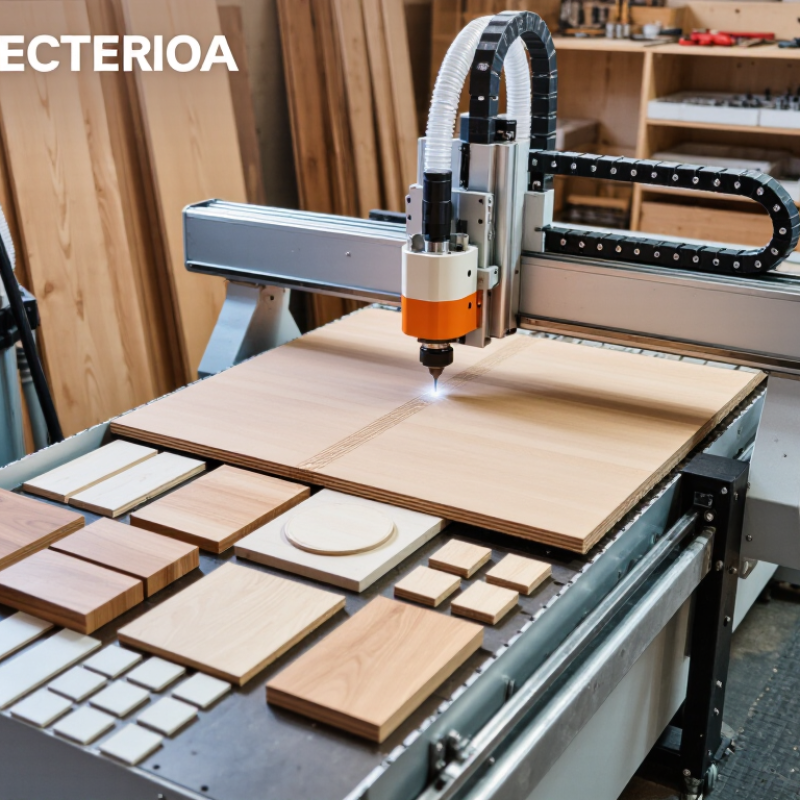
How to Choose the Best CNC Wood Router for Your Business

Define Your Business Needs and Production Goals

How to Choose the Best CNC Wood Router for Your Business

Define Your Business Needs and Production Goals

A suitable CNC wood router begins with your actual work, not attractive specifications. List the materials, sheet sizes, thicknesses, and designs you produce most often. A cabinet workshop may need a large working area and fast drilling. A custom furniture studio may value smooth three-dimensional carving more. Consider your weekly order volume, available floor space, and operator experience. Your first estimate may be wrong. Review recent orders before choosing equipment.

Tips: Record cutting times for typical jobs. Compare them with your target output. Check spindle power, table size, tool compatibility, dust collection, and control software. Leave room for maintenance and unexpected delays. Ask operators to test the workflow using real materials.

Production goals should be measurable. Set targets for daily pieces, acceptable cutting time, surface quality, and material waste. If you plan to grow, calculate whether the machine can handle future workloads without constant overtime. Higher speed is not always better. Aggressive settings can damage edges, increase noise, and shorten tool life. In practical workshops, reliable repeatability often matters more than impressive maximum speed. Confirm service access, training options, electrical requirements, and documented safety procedures. A careful comparison may feel slower, but it can prevent an expensive mismatch.

Compare CNC Router Types, Sizes, and Key Features

Choosing the best CNC wood router starts with comparing machine types, not browsing feature lists. A fixed-gantry router offers rigidity for cabinet panels and repeated production. A moving-gantry model usually handles larger sheets with a smaller footprint. For detailed carving, a compact desktop router provides better visibility and easier setup. It may sacrifice speed. In practical shop testing, the strongest choice depended on material flow, not advertised power.

Size should match your typical workpiece, plus room for loading and safe movement. A 4-by-8-foot bed suits full plywood sheets, but it demands considerable floor space. A smaller 4-by-4-foot table reduces cost and may improve workflow for signs, doors, and furniture parts. Check Z-axis clearance carefully. Thick timber, spoilboards, clamps, and dust shoes can quickly consume available height. I once underestimated loading space; the router fit, but turning a panel became awkward.

Key features deserve practical comparison. Variable spindle speed helps when switching between softwood, hardwood, and sheet goods. A rigid frame, accurate linear motion, and reliable homing support repeatable cuts. Dust collection protects visibility, finish quality, and breathing conditions. Consider automatic tool changing only when multiple tools genuinely reduce production time. Otherwise, it adds maintenance and another failure point. Test sample cuts before purchase, and record edge quality, noise, setup time, and waste. The perfect specification can still disappoint.

How to Choose the Best CNC Wood Router for Your Business

Larger CNC routers provide more working area for full panels and batch production, while compact formats require less floor space and are easier to install. Choose a router size according to your largest workpiece, production volume, available space, and required spindle power.

The chart uses common nominal router formats. Working-area values are calculated from standard dimensions; actual cutting travel may be slightly smaller because of machine structure, clamps, and safety margins.

Evaluate Cutting Performance, Accuracy, and Software Compatibility

Choosing the best CNC wood router starts with cutting performance, not machine size. In daily production, test the materials you actually sell, such as 18 mm plywood, hardwood, or laminated panels. A powerful spindle may cut quickly, but excessive heat can burn edges and shorten tool life. Feed rate, spindle speed, collet quality, and dust removal must work together. They often do not perform perfectly on the first setup.

Accuracy deserves a practical test. Cut several identical cabinet parts and measure their edges with calipers. Check hole positions, corner sharpness, and repeatability after several hours of operation. A claimed tolerance means little without stable calibration and a rigid frame. I once trusted a precise-looking sample, then found small size changes after continuous cutting. That mistake taught me to inspect results, not promises. Leave room for maintenance, because loose belts and dusty rails gradually affect accuracy.

Software compatibility can determine whether the router saves time or creates daily frustration. Confirm support for your design files, nesting tools, toolpath simulation, and required post-processors. Simulation should reveal collisions, incorrect cutting depths, and wasted material before production begins. Ask whether updates preserve older projects and whether operators can restore settings after a computer failure. Simple controls matter. A capable machine is less useful when staff need constant technical assistance. Test the complete workflow with one real project before making a purchase decision.

Calculate Total Ownership Costs, Safety, and Maintenance Needs

Choosing a CNC Wood Router for Your Business

The purchase price is only the beginning. Calculate total ownership costs before comparing machine specifications. Include tooling, software, electricity, dust collection, training, repairs, and operator time. A cheaper router may require more frequent adjustments or costly upgrades. Measure your expected production hours, not only the advertised cutting speed. My first estimate was too optimistic because I ignored setup time between jobs.

Safety also affects ownership costs. Look for enclosed cutting areas, reliable emergency stops, clear visibility, and effective dust extraction. Fine wood dust can damage equipment and create serious workplace risks. Check whether the machine supports practical guarding and follows applicable workplace safety requirements. Operators need training, written procedures, and comfortable access to controls. Small details matter. A poorly positioned control panel can encourage unsafe movements during busy shifts.

Maintenance needs deserve a realistic budget. Ask how often rails, bearings, belts, filters, and cutting tools require inspection or replacement. Confirm whether common parts are easy to obtain and whether technicians can reach critical components without dismantling half the machine. Keep a maintenance log with dates, symptoms, and corrective work. It can reveal recurring alignment problems before they interrupt production. Plan for downtime, too. An unfinished order has a cost that rarely appears in the sales quotation. A spreadsheet helps, but actual workshop records are better.

How to Choose the Best CNC Wood Router for Your Business - Calculate Total Ownership Costs, Safety, and Maintenance Needs

A practical comparison of common CNC wood-router configurations for professional woodworking operations

Router Category Typical Working Area Typical Spindle Power Estimated Purchase Price Typical Power Requirement Suitable Workload Estimated Annual Maintenance Five-Year Ownership Cost* Key Safety Requirements Maintenance Considerations Business Fit
Desktop CNC Router 300 × 400 mm to
600 × 900 mm
0.5–1.5 kW US$1,500–US$5,000 Single-phase, commonly 110–240 V;
approximately 1–3 kW connected load
Prototypes, signs, small decorative parts, light-duty engraving, and training US$150–US$500 US$2,500–US$8,500 Eye protection, hearing protection, dust extraction, secure workholding, emergency stop, and guarded cutting area Clean rails and lead screws frequently; inspect belts, collets, cables, and spoilboard condition; replace small cutting tools regularly
Compact 3-Axis Router 600 × 900 mm to
1,300 × 900 mm
1.5–3.5 kW US$5,000–US$15,000 Single-phase, commonly 220–240 V;
approximately 3–6 kW connected load
Custom furniture parts, cabinet components, signage, and small-batch production US$400–US$1,200 US$7,500–US$20,500 Full dust collection, emergency-stop circuit, proper grounding, hearing and eye protection, and operator training Lubricate linear motion components according to the manual; check spindle runout, fasteners, vacuum hoses, and machine squareness
Full-Sheet 3-Axis Router 1,300 × 2,500 mm
(approximately 4 × 8 ft)
3–9 kW US$15,000–US$45,000 Single- or three-phase, commonly 220–480 V;
approximately 8–18 kW connected load
Cabinet production, nested-based manufacturing, doors, panels, and repetitive batch work US$1,000–US$3,000 US$22,000–US$62,000 Interlocked enclosure or perimeter guarding, emergency stops, dust extraction, lockout/tagout procedures, and documented training Inspect vacuum-table seals, pumps, spindle cooling, tool-holding components, linear guides, and automatic lubrication systems
Industrial 3-Axis Production Router 1,500 × 3,000 mm
or larger
6–15 kW US$45,000–US$120,000 Three-phase, commonly 380–480 V;
approximately 15–35 kW connected load
High-volume sheet processing, continuous production, and demanding hardwood or composite applications US$3,000–US$8,000 US$65,000–US$155,000 Engineered guarding, interlocked access doors, safety-rated controls, extraction monitoring, lockout/tagout, and formal risk assessment Use a preventive-maintenance schedule; monitor spindle bearings, drive systems, vacuum performance, alignment, and electrical cabinet filters
4-Axis or Rotary-Axis Router Commonly 1,300 × 2,500 mm
with rotary capacity
3–9 kW US$25,000–US$80,000 Single- or three-phase, commonly 220–480 V;
approximately 8–20 kW connected load
Posts, columns, furniture legs, relief carving, curved components, and multi-sided work US$1,500–US$5,000 US$35,000–US$105,000 Rotary-axis guarding, secure chuck or fixture design, overspeed protection, dust extraction, and controlled access during operation Check rotary-axis backlash, chuck or collet condition, calibration, cable routing, spindle cooling, and rotary lubrication points Choose only when curved or multi-sided work justifies the added complexity
Cost and selection notes:
  • *Five-year ownership costs are planning estimates that include the purchase price, routine maintenance, cutting tools, dust-collection consumables, and basic service allowance. They exclude rent, labor, financing, taxes, major upgrades, and production downtime.
  • Actual costs vary with machine size, duty cycle, local electricity rates, extraction capacity, tool usage, service availability, and the required level of automation.
  • Before purchasing, confirm available voltage and phase, floor loading, ventilation, dust-extraction capacity, access for delivery, operator training, guarding, emergency-stop requirements, and applicable workplace regulations.
  • For a more accurate total-cost calculation, use: Purchase Price + Installation + Training + Five-Year Maintenance + Five-Year Tooling + Five-Year Energy + Expected Downtime Cost − Resale Value.

Select a Reliable Supplier and Plan for Future Expansion

Choosing a CNC wood router is not only about cutting speed or machine size. Your supplier can shape daily production for years. Look for clear specifications, stable build quality, and practical installation support. Ask how the machine handles plywood, hardwood, and repeated production cycles. A reliable supplier should explain spindle options, bed structure, dust collection, software compatibility, and maintenance intervals. Their answers should be specific, not promotional.

Tips: Request a live cutting demonstration with your own sample material. Check edge quality, noise, dust control, and tool changes. Ask for references from businesses with similar workloads. Confirm spare-part availability, technician response times, training, and warranty conditions. A low purchase price may become expensive when production stops.

Plan beyond your current orders. Choose a router with enough working area, power, and control capacity for possible expansion. Modular vacuum systems and extra tool positions can reduce future replacement costs. Discuss upgrade paths before signing an agreement. For example, confirm whether the controller can support another axis or automated loading later. Document every promise in the quotation. I have seen vague service commitments cause avoidable delays. No supplier gets every detail right. A careful buyer still checks everything. Also consider your workshop layout, operator skills, electrical supply, and dust extraction capacity. Growth is useful, but unused capacity can burden cash flow.